How to Watch Live Sports With IPTV in 2026: A Complete Guide to Sports Streaming
Watching live sports over the internet has undergone a massive transformation. Modern fans no longer rely exclusively on cable bundles or satellite dishes to follow their favorite teams, leagues, and international tournaments. Internet Protocol Television (IPTV) has emerged as a major delivery mechanism for live sports broadcasts, providing high-definition video, flexible multi-device access, and interactive program guides.
However, streaming live sports successfully requires more than simply installing an application on your Smart TV. Live athletic events present unique technical challenges for video streaming platforms. Unlike on-demand movies or pre-recorded series, live sports demand continuous high-bitrate encoding, low-latency transmission, synchronized program guide metadata, and robust server infrastructure to handle millions of simultaneous viewers.
Achieving a smooth, stutter-free sports streaming experience depends on a chain of technical factors: legitimate broadcasting rights, reliable server delivery, adequate local internet bandwidth, optimized device decoders, accurate EPG schedule metadata, and proper player configuration.
This comprehensive guide explains how live sports streaming through IPTV works in 2026. We examine essential hardware requirements, platform selection, regional broadcasting rights, video quality optimization, latency dynamics, troubleshooting buffering issues, and how to select authorized service providers.
How to watch live sports with IPTV in 2026What Is IPTV Sports Streaming?
To configure your system effectively, it is essential to understand the underlying technology of IPTV sports streaming. Internet Protocol Television (IPTV) is the delivery of television content over IP-based networks, rather than traditional terrestrial, satellite signal, or cable television formats.
It is equally important to distinguish between live television and on-demand streaming:
- On-Demand Content (VOD): Pre-rendered video files stored on servers that can be buffered ahead of time without real-time distribution constraints.
- Live Sports Streaming: Real-time video feeds encoded directly from venue cameras and production control rooms, delivered live with minimal buffering margins.
Furthermore, users must understand the distinction between an IPTV player application and an IPTV service provider:
- The IPTV Player: Software running on your device (such as TiviMate, SmartOne IPTV, or IPTV Smarters) responsible for decoding video feeds and rendering navigation menus. The player does not include sports channels or built-in media content.
- The IPTV Service Provider: The service (such as IPTVDoor) that delivers actual channel streams, Electronic Program Guide (EPG) metadata, and server infrastructure.
Pairing a high-performance player application with an authorized subscription package ensures you get stable, legal access to your favorite sporting events.
How Does Live Sports Streaming With IPTV Work?
Streaming a live match from a stadium to your living room screen involves a multi-stage technical workflow:
- Broadcast Capture and Encoding: Camera feeds at the sports stadium are processed by production units and sent to distribution servers, where hardware encoders convert raw video into digital stream formats (H.264, HEVC/H.265, or AV1).
- CDN Distribution: The encoded video stream is pushed to Content Delivery Networks (CDNs) designed to distribute high-bandwidth live data to global viewers.
- Authorized Service Connection: Users log into their authorized service provider account via their Smart TV or streaming device using secure API protocols (such as Xtream Codes or M3U playlist URLs).
- EPG Synchronization: The IPTV player parses XMLTV program guide data to display current event schedules, match kickoff times, and team listings.
- Stream Decoding and Playback: When a user selects a channel, the IPTV player connects to the stream URL, fills a small buffer memory, decodes the video frame by frame, and displays the broadcast on the screen.
When every step in this pipeline operates correctly, viewers enjoy crisp, uninterrupted sports coverage in HD or 4K resolution.
What Do You Need to Watch Live Sports With IPTV?
Setting up your home entertainment system for live sports requires a combination of reliable network hardware, a compatible television or streaming device, and optimized player software.
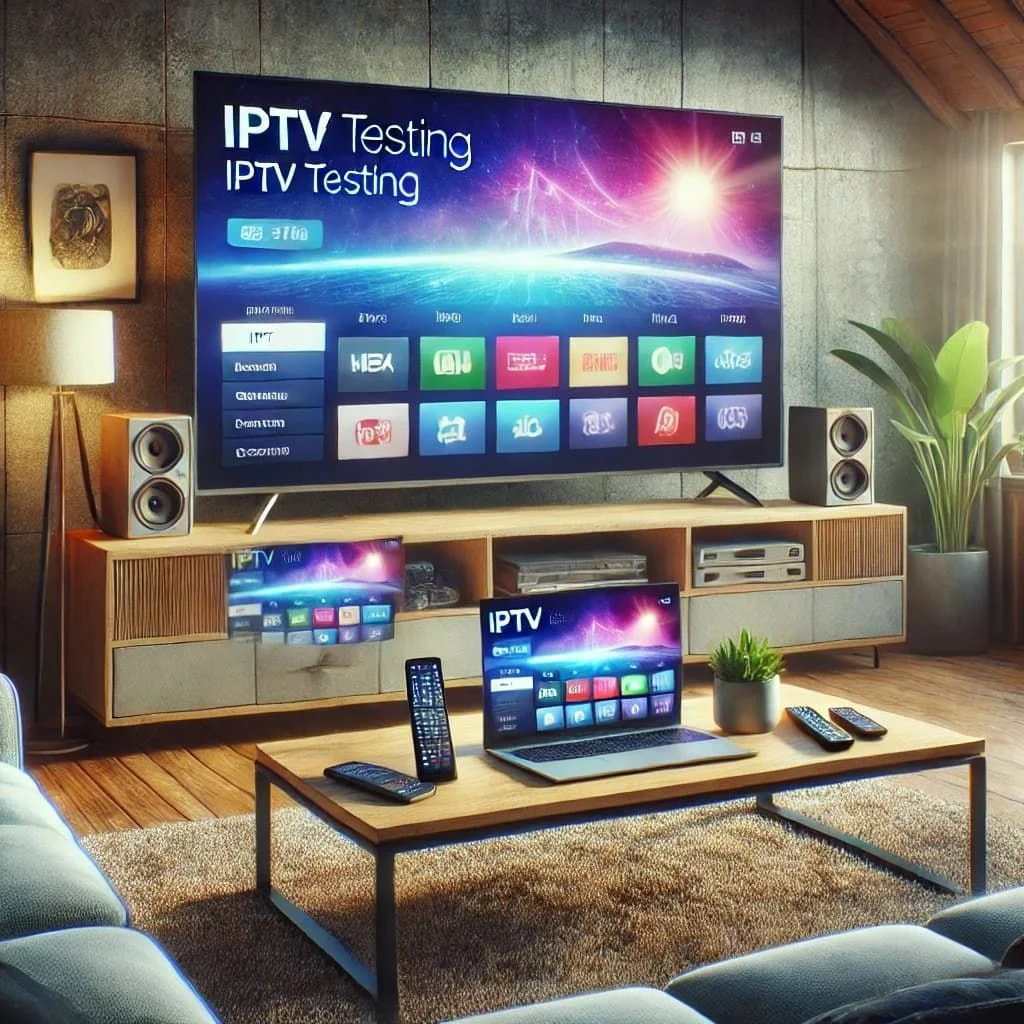
 IPTV sports streaming hardware setup
A Reliable Internet Connection
Live sports demand consistent network throughput. Unlike standard web browsing, live streaming cannot tolerate data packet drops.
Key connection factors include:
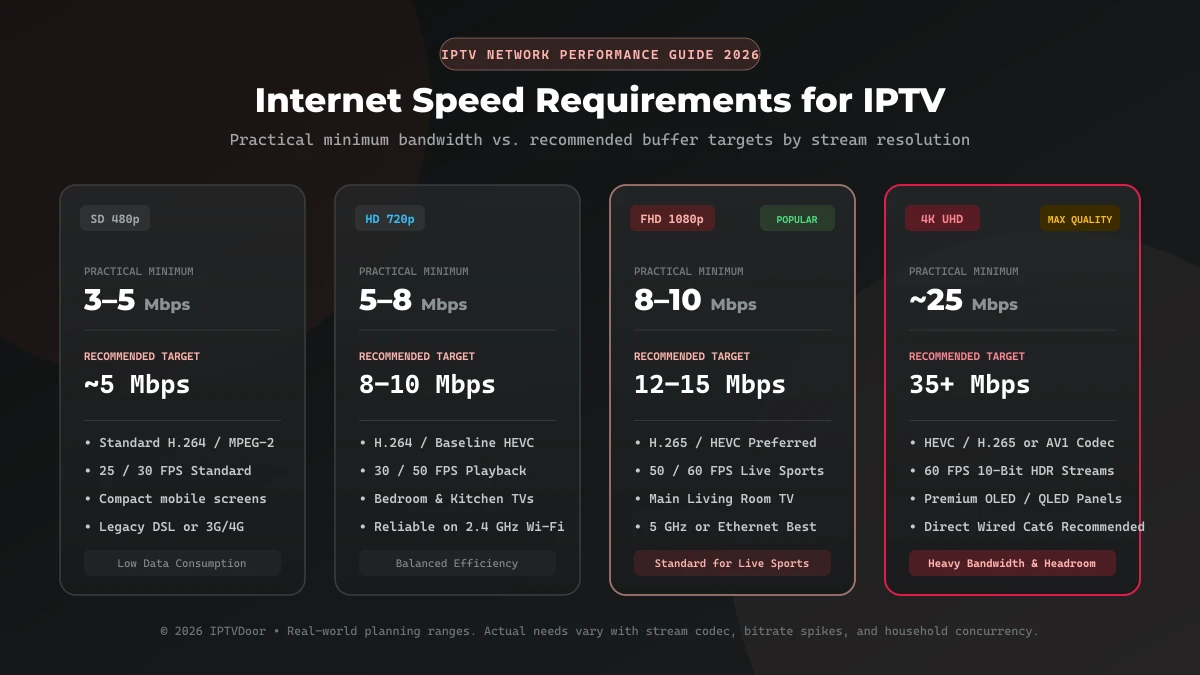
- Download Speed: As a baseline recommendation, Standard Definition (SD) streams require 5 to 10 Mbps; High Definition (720p/1080p) streams require 15 to 25 Mbps; and 4K Ultra HD sports broadcasts demand 50 Mbps or higher of sustained download speed.
- Connection Stability: Sustained bandwidth is more important than short burst speeds. Network jitter and packet loss cause sudden pixelation and stream drops during live matches.
- Ethernet vs. Wi-Fi: Connecting your Smart TV or streaming box directly to your router via an Ethernet cable eliminates wireless interference, wall obstruction degradation, and Wi-Fi latency spikes.
- Network Congestion: Simultaneous heavy bandwidth usage on your home network—such as large file downloads, online gaming, or multiple 4K streams—can starve your IPTV player of necessary buffer data.
A Compatible Streaming Device
Your choice of playback hardware dictates stream decoding efficiency and user interface fluidity. Supported devices include:
- Smart TVs: Samsung Smart TVs running Tizen OS, LG Smart TVs running webOS, and televisions with built-in Android TV or Google TV (Sony, Philips, TCL, Hisense).
- Dedicated Streaming Boxes: Apple TV 4K, Nvidia Shield TV, Chromecast with Google TV, and Amazon Fire TV Stick 4K Max. Dedicated streaming devices generally offer faster processors and larger memory capacity than entry-level TV chipsets.
- Mobile Devices & Computers: Android smartphones, iPhones, iPads, Windows PCs, and Mac computers for portable sports viewing.
Explore detailed platform compatibility in our IPTVDoor setup guide.
A Compatible IPTV Player
Select a media application that matches your device's operating system and supports your provider's login protocol (Xtream Codes API or M3U playlist). A quality player should provide fast channel zapping, EPG timeline grids, custom category filtering, and aspect ratio controls. For an in-depth platform analysis, read our guide on the Best IPTV Players for Smart TV in 2026.
How to Choose an IPTV Service for Live Sports
Selecting a reliable provider is the single most critical decision for sports enthusiasts. Evaluating potential services on key operational criteria prevents disappointment on match day.
Check Sports Coverage
Before committing to a subscription, verify whether the service carries the specific sports leagues and channels you follow. Review match schedules, regional sports networks (RSNs), and pay-per-view availability. Never assume a service carries every match globally without checking documented channel lineups.
Check Regional Availability
Sports broadcasting rights are licensed on a country-by-country basis. A broadcaster holding exclusive rights to live football in the United Kingdom may not hold rights to the same competition in the United States or Canada. Ensure your provider operates in compliance with regional availability and licensing rules in your territory.
Check Video Quality
Evaluate the provider's broadcast parameters:
- Resolution: Verify whether channels stream in true 1080p Full HD or 4K UHD rather than upscaled 720p.
- Frame Rate: Sports streams require high frame rates (50 fps or 60 fps) to render fast-moving balls, pucks, and players smoothly. 30 fps streams can appear motion-blurred during fast action.
- Bitrate: A higher bitrate ensures sharp image detail without blocky compression artifacts during dense crowd shots or grass movement.
Check EPG Quality
An accurate Electronic Program Guide is essential for tracking kickoff times, identifying channel numbers for specific fixtures, and setting program reminders. Look for providers offering XMLTV EPG feeds with reliable time-zone adjustment support.
Check Reliability During Major Events
High-profile sports events—such as championship finals or derby matches—draw massive concurrent viewer numbers. Reliable service providers invest in scalable server infrastructure and load-balanced CDN nodes to prevent stream crashes during peak traffic spikes.
Review Pricing and Terms
Compare subscription tiers, billing cycles, simultaneous stream allowances, and refund policies transparently displayed on official plan pages, such as IPTVDoor pricing plans.
[IPTVDOOR_OFFER_CARD]
How to Watch Different Sports With IPTV
Different sports present unique broadcasting dynamics, camera motion patterns, and scheduling requirements. Understanding these characteristics helps you optimize your viewing setup.
Live Football (Soccer)
Football is the world's most watched sport, featuring competitions such as the Premier League, UEFA Champions League, La Liga, Serie A, Bundesliga, Ligue 1, and international tournaments.
- Viewing Considerations: Look for 50/60 fps streams to keep ball movement fluid across wide stadium pans. Use EPG time shift features to align match schedules with your local clock, as described in our guide on How to Fix IPTV EPG Time Shift.
- Match-Day Traffic: Popular derby matches create high network traffic; ensure your router bandwidth is fully allocated to your streaming TV.
Live Basketball (NBA & International)
Basketball features rapid transitions, fast court movement, and frequent scoring updates.
- Viewing Considerations: High frame rate rendering (60 fps) is crucial for tracking basketball movement clearly. Low network latency is important if you follow live score updates alongside your broadcast.
NFL and American Football
American football broadcasts involve high-definition graphics, multiple camera angles, instant replays, and long event durations.
- Viewing Considerations: Verify that your service supports regional network affiliates and Sunday sports packages. Stable long-term buffer management ensures zero disconnects during multi-hour game coverage.
Baseball (MLB)
Major League Baseball seasons span 162 regular-season games per team, often broadcast daily across regional sports networks.
- Viewing Considerations: Category organization and search functionality within your IPTV player allow you to quickly bookmark your favorite team's regional channel.
NHL and Ice Hockey
Ice hockey is among the fastest team sports on television, requiring maximum clarity to follow the puck against white ice backgrounds.
- Viewing Considerations: True 1080p at 60 fps combined with high video bitrate prevents puck blur and trail artifacts.
Formula 1 and Motorsport
Motorsport events feature high-speed vehicles, track telemetry, and multi-feed options (cockpit cameras, pit lane tracks, driver timing).
- Viewing Considerations: 4K HDR streaming enhances color depth and vehicle details on large screen Smart TVs.
Tennis, Boxing and MMA
Individual combat and court sports involve unpredictable match durations and global venue timezones.
- Viewing Considerations: Accurate EPG listings help track tournament brackets and main card fight times across global time zones.
Best Devices for Watching Live Sports With IPTV
Selecting the right device hardware ensures your system handles demanding high-bitrate video decoding without buffering or thermal throttling.
 High quality live sports streaming on Smart TV
The following table compares the top streaming device platforms for live sports IPTV in 2026:
| Device Category | Best For | Advantages | Potential Limitations |
|---|---|---|---|
| Android TV / Google TV | Ultimate Sports Experience | Native TiviMate support, 4K HDR decoding, Ethernet ports, side-loading freedom | Varies by manufacturer hardware quality |
| Apple TV 4K | Smooth Performance & UI | Powerful A-series processor, smooth 60 fps rendering, excellent color accuracy | Higher initial hardware cost |
| Amazon Fire TV 4K Max | Value & Portability | Affordable, supports Wi-Fi 6E, compact HDMI stick form factor, broad app store | USB Ethernet adapter required for wired setup |
| Samsung Smart TV (Tizen) | Integrated Convenience | No external box needed, single remote control, vibrant display optimization | Strict app store restrictions |
| LG Smart TV (webOS) | Magic Remote Navigation | Intuitive pointer control, crisp 4K panel integration, dark mode UI | Memory limits on older webOS versions |
| PC / Mac Computer | Multi-Screen Monitoring | Supports multiple browser windows, advanced player controls, recording | Requires desktop setup |
For detailed step-by-step setup guides across all devices, consult the IPTVDoor installation directory.
How to Reduce IPTV Buffering During Live Sports
Stream buffering during a crucial sports moment can destroy the viewing experience. Implementing these 10 practical troubleshooting steps minimizes stream freezing:
 Troubleshooting live sports buffering on IPTV
- Connect via Ethernet Cable: Replace wireless Wi-Fi connections with a Cat6 Ethernet cable to guarantee constant network throughput to your television.
- Reposition Your Wi-Fi Router: If Ethernet is unavailable, place your wireless router closer to your TV and connect to the 5 GHz Wi-Fi band instead of the slower 2.4 GHz band.
- Limit Background Network Activity: Pause cloud backups, torrent downloads, game updates, and secondary video streams on other home devices while watching live matches.
- Restart Network Equipment: Power cycle your internet modem and router before major games to clear cache memory and refresh IP leases.
- Adjust Video Stream Resolution: If your internet connection experiences temporary slowdowns, switch the stream quality from 4K/FHD to 1080p or 720p inside your IPTV player settings.
- Isolate Channel Issues: Check if buffering occurs on a single sports channel or across all channels. If only one channel buffers, the issue is service-side. For details, consult IPTV Channels Load but Won't Play.
- Test an Alternate Device: Load your playlist on a smartphone or computer to verify whether buffering is caused by TV hardware limitations.
- Diagnose Peak-Hour Congestion: If buffering occurs exclusively during evening prime time or major weekend finals, review our guide on IPTV Buffering Only at Night.
- Update Your IPTV Player App: Keep your player application updated to ensure compatibility with updated video codecs and streaming protocols.
- Clear Player App Cache: Navigate to your device settings, locate your IPTV application, and clear the application cache memory to resolve glitches.
For persistent disconnect issues, follow our diagnostic guide: IPTV Keeps Disconnecting: Why It Happens and How to Fix It.
Why IPTV Sports Streams Can Be Behind Live TV
Viewers often notice that live sports streams on IPTV lag several seconds (or up to a minute) behind satellite broadcasts or over-the-air antenna feeds.
Stream delay is caused by several inherent technical processes:
- Encoding Delay (2 to 5 seconds): Live video captured at the venue must be compressed into digital formats (H.264/HEVC) by broadcast encoders.
- Segment Chunking (4 to 10 seconds): Streaming protocols (HLS or DASH) break video into small file segments (2 to 6 seconds each) for HTTP delivery.
- CDN Distribution (2 to 5 seconds): Video segments travel across content delivery networks and edge servers to reach local ISPs.
- Player Buffer Margin (5 to 15 seconds): IPTV player software creates a local buffer memory on your device to store incoming video segments, preventing playback stutter if your network fluctuates.
Combined, these steps produce a standard streaming delay of 15 to 45 seconds compared to real-time stadium action. This latency is normal across all internet streaming services.
How to Use the EPG to Find Live Sports
An Electronic Program Guide (EPG) transforms live sports streaming into an organized, set-top box experience.
Follow these steps to navigate live sports using your EPG:
- Open the EPG Timeline: Press the Guide or EPG button on your remote control inside your player application.
- Filter by Category: Select the "Sports" folder to filter out news, entertainment, and movie channels.
- Search for Specific Teams or Matches: Use your player's search tool to type team names or event titles.
- Verify Kickoff Times: Check the event start time displayed in the guide grid. If event times appear incorrect, review our guide on How to Fix IPTV EPG Time Shift.
- Set Program Reminders: Utilize player features to schedule onscreen notifications before kickoff.
Is Watching Sports Through IPTV Legal?
A fundamental distinction exists between IPTV technology and the legality of specific content streams:
- IPTV Technology is Legal: IPTV is a standard internet protocol used by major telecommunications companies, public broadcasters, and authorized live-TV platforms worldwide.
- Content Legality Depends on Licensing: The legal status of a stream depends entirely on whether the provider holds valid distribution licenses for the specific sports events and broadcasting territories.
Red Flags of Questionable Services
Viewers should avoid unverified third-party providers that display warning signs:
- Claims to offer every premium sports channel worldwide for a suspiciously low price.
- Lack of transparent company registration, physical business addresses, or official terms of service.
- Requests for non-standard payment channels or downloads from unverified third-party APK links.
- Instructions to bypass DRM protections or regional broadcasting restrictions illegally.
Always ensure you subscribe to authorized services operating within regional copyright laws.
IPTV vs Official Sports Streaming Services
Understanding how broad IPTV/live-TV platforms compare with dedicated single-sport streaming apps helps you select the right solution.
| Feature / Metric | Broad IPTV / Live-TV Platform | Dedicated Sports Streaming App |
|---|---|---|
| Channel Variety | Thousands of live TV channels across sports, news, and entertainment | Restricted to specific sports leagues or single broadcaster catalogs |
| Sports Specialization | Broad coverage across multi-sport regional networks | Deep coverage of single leagues (e.g., dedicated league passes) |
| EPG Integration | Full multi-channel TV guide grid | On-demand event catalogs and scheduled fixture lists |
| Device Support | Smart TVs, Firestick, Android TV, Apple TV, Mobile | Smart TVs, Mobile apps, Web browsers |
| Pricing Structure | Flexible monthly or annual multi-channel packages | Subscription fees per league or sports package |
| Regional Rights | Varies by package and subscriber territory | Territory-locked based on local broadcast rights |
Both service models offer distinct advantages: dedicated apps excel for fans following a single league, while broad IPTV platforms provide comprehensive coverage for multi-sport households desiring full live TV lineups.
Common Mistakes When Watching Live Sports With IPTV
Avoid these common pitfalls to maintain optimal playback performance during match days:
- Choosing a Service Based Solely on Channel Count: Prioritize stream stability, high frame rates (60 fps), and server reliability over raw channel numbers.
- Relying on Weak Wi-Fi for 4K Sports: Streaming 4K sports over crowded 2.4 GHz Wi-Fi leads to buffering; always use 5 GHz Wi-Fi or Ethernet.
- Ignoring Time-Zone EPG Offset: Failing to set your EPG timezone correctly can cause you to miss match kickoffs.
- Expecting Zero-Latency Streams: Expecting IPTV streams to match real-time radio or stadium audio is unrealistic due to HTTP streaming buffers.
- Using Outdated TV Hardware: Decoding high-bitrate 4K sports on older budget Smart TVs can cause freezing; consider adding a dedicated 4K streaming stick.
- Overlooking Audio Codec Compatibility: If video plays but sound is silent, consult our guide on IPTV Black Screen but Audio Works.
- Testing Only During Non-Peak Hours: Evaluate your setup during actual match-day hours when internet routing and server traffic are heavily loaded.
How to Set Up IPTV for Live Sports
Setting up your system to stream live sports requires simple, methodical configuration:
- Select an Authorized IPTV Service: Register for a subscription plan with an authorized provider, such as IPTVDoor subscription plans.
- Confirm Sports Channel Lineups: Verify that your chosen plan includes the regional sports networks carrying your favorite events.
- Install a Compatible IPTV Player: Download a top-rated player (such as SmartOne IPTV, IBO Player Pro, or TiviMate) directly from your TV's app store.
- Import Your Credentials: Enter your Xtream Codes API server URL, username, and password provided by your service.
- Configure EPG & Timezone Settings: Enable auto-update for XMLTV program guides and adjust time offset settings to match your local clock.
- Optimize Playback Settings: Select hardware decoding (HW acceleration) and enable high frame rate rendering in your player settings.
- Test Playback Before Kickoff: Open your sports channel 15 minutes before the match starts to confirm stream stability and buffer health.
For comprehensive device installation walkthroughs, visit our step-by-step IPTVDoor setup guide.
[IPTVDOOR_OFFER_CARD]
Frequently Asked Questions
Conclusion
Streaming live sports with IPTV in 2026 offers fans unprecedented flexibility, high-definition video clarity, and sophisticated program guide navigation across Smart TVs and streaming devices.
By selecting an authorized provider, establishing a stable wired or 5 GHz Wi-Fi network connection, choosing hardware capable of 60 fps rendering, and configuring your EPG correctly, you can enjoy seamless coverage of your favorite sports leagues and international tournaments.
To explore high-performance live TV options tailored for your home setup, explore IPTVDoor pricing plans today, or visit our complete IPTV installation guide for step-by-step installation instructions.